

Does AI actually save time at work? It is one of the most important workplace questions of the decade, and the honest answer is more interesting than a simple yes or no. AI can absolutely help people move faster. It can summarize a long document, draft a first email, clean up notes, suggest code, brainstorm headlines, translate tone, and turn a blank page into something you can react to. For a lot of workers, that feels like magic.
But feeling faster is not always the same thing as being more productive. Sometimes AI saves ten minutes for the person using it and creates thirty minutes of review work for someone else. Sometimes it speeds up a draft but adds new time for fact-checking, editing, privacy review, testing, or correcting confident mistakes. Sometimes it helps beginners more than experts. And sometimes it makes work feel easier even when the measured task time does not improve.
That is why the current evidence on AI productivity at work is messy. Not bad. Not fake. Messy. The best way to think about it is this: AI does not automatically make a job faster. It changes where time is spent. Whether that trade is good depends on the task, the worker, the workflow, the quality bar, and the way the organization measures success.
The Simple Answer: AI Saves Time on Some Tasks, Not Whole Jobs
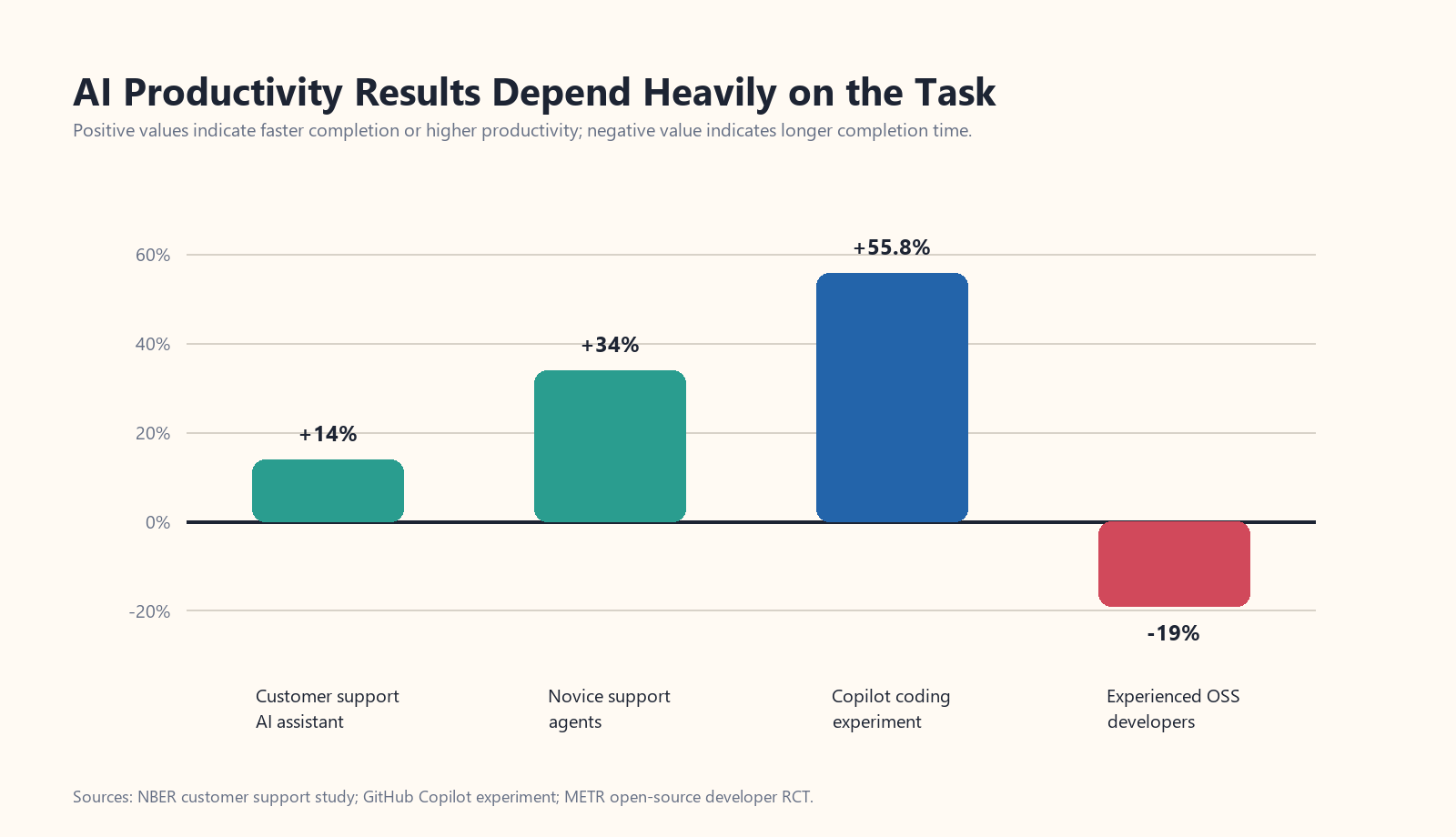
The strongest evidence for AI saving time usually comes from narrow, repeatable tasks where the output can be checked quickly. A famous example is the customer-support study by Erik Brynjolfsson, Danielle Li, and Lindsey Raymond, published as Generative AI at Work. The researchers studied 5,179 customer support agents after a generative AI assistant was rolled out. Access to the tool increased productivity, measured as issues resolved per hour, by 14% on average. The gains were much larger for novice and lower-skilled workers, who improved by 34%, while the impact on more experienced workers was smaller.
Other controlled research also finds gains for writing and communication tasks. Shakked Noy and Whitney Zhang’s Science study on generative AI and writing productivity found that access to ChatGPT helped participants complete professional writing tasks faster while improving average output quality. Again, the setup matters: short writing assignments, clear goals, and human review.
So yes, AI can save time. It is especially useful when the work is text-heavy, repetitive, and easy to evaluate. Drafting a polite reply, summarizing a meeting, creating a first-pass outline, extracting action items, reformatting notes, generating simple code examples, and comparing options are all places where workers often see real speed gains.
Why the Productivity Evidence Gets Messy
The confusion begins when we move from “this task was faster” to “this job became more productive.” Those are different claims. A person might draft emails faster but send more emails that do not need to exist. A manager might generate more reports but make no better decisions. A software developer might produce more code but create extra review burden. A marketing team might create more content but not generate more sales.
This is the classic productivity measurement problem. What should count as productivity? More output? Higher quality? Lower cost? Less stress? Faster cycle time? Better customer satisfaction? Higher revenue? Fewer errors? If the metric is poorly chosen, AI can appear more useful than it really is.
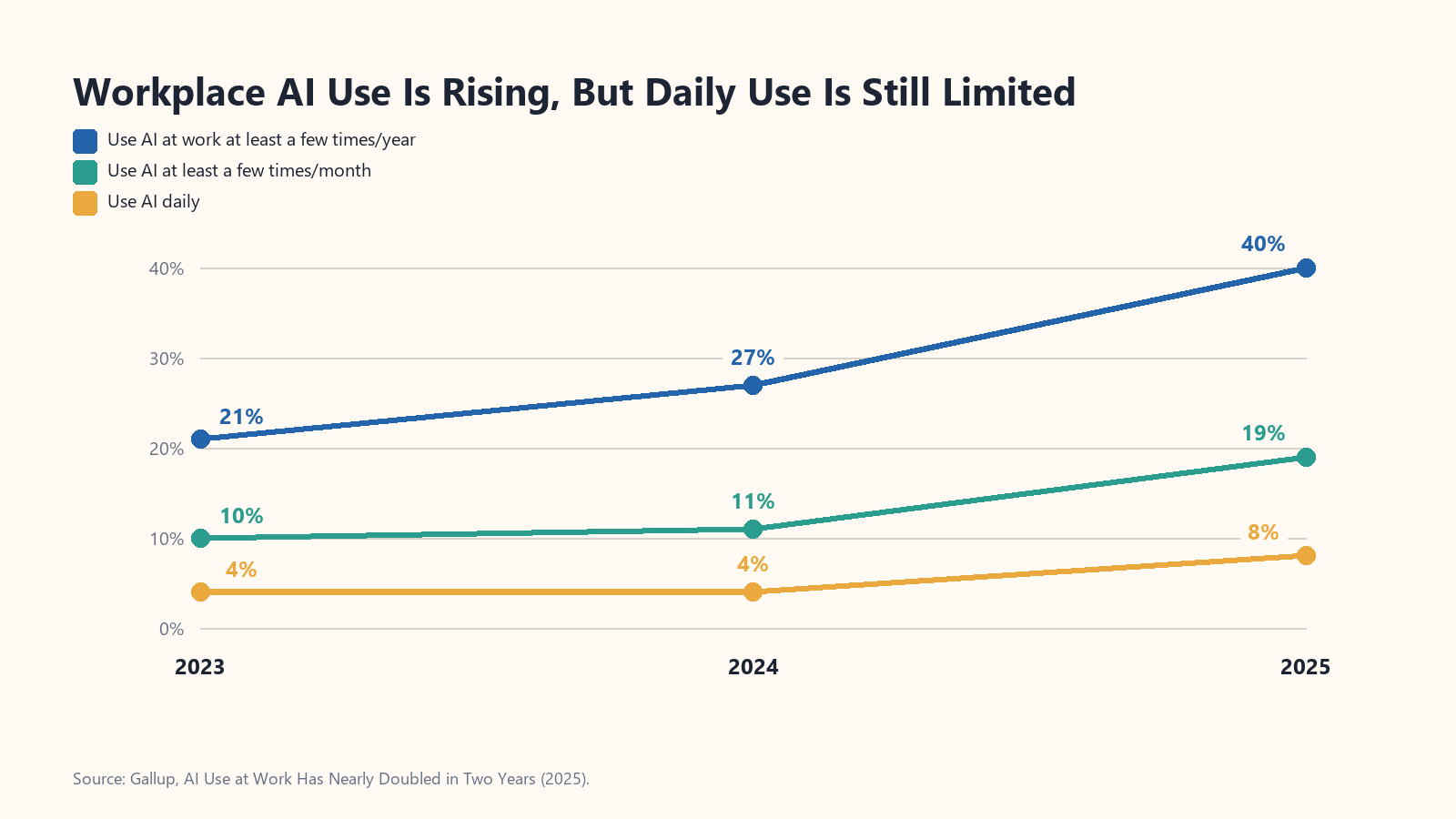
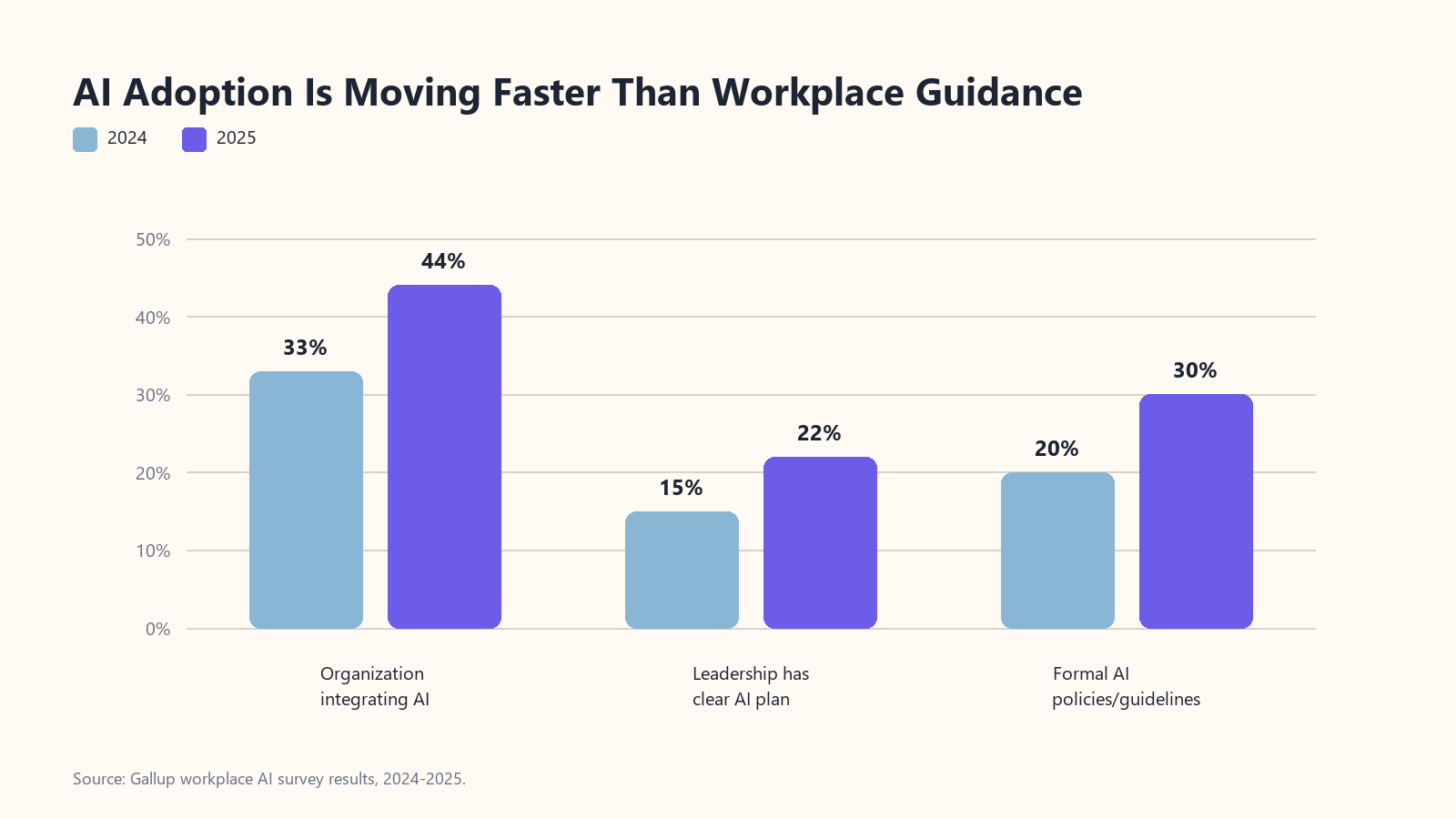
Gallup’s workplace data shows how uneven adoption still is. In its 2025 report, AI Use at Work Has Nearly Doubled in Two Years, Gallup found that U.S. employees using AI at work at least a few times per year rose from 21% in 2023 to 40% in 2025. Frequent use also rose from 11% to 19%. But Gallup also found a guidance gap: 44% of employees said their organization had begun integrating AI, while only 22% said leadership had communicated a clear plan. Only 30% said their organization had general guidelines or formal policies.
That matters because AI is not just a tool you toss into a workplace and call it transformation. It needs a job to do. If employees do not know when to use it, when not to use it, what data is safe to share, how outputs should be reviewed, or what quality standard matters, the tool can create confusion instead of speed.
The same pattern appears in enterprise AI investment. The MIT Project NANDA report, The GenAI Divide: State of AI in Business 2025, reported that many companies were experimenting with generative AI but few were seeing measurable profit-and-loss impact. The report argued that the divide was not mainly about model quality or regulation. It was about whether AI tools actually fit into daily workflows and improved over time.
Coding Shows Both the Promise and the Problem
Software development is a perfect example because the evidence points in both directions. In a controlled experiment on GitHub Copilot, researchers found that developers with access to the AI assistant completed a programming task much faster than those without it. The paper, The Impact of AI on Developer Productivity, reported that developers using Copilot finished an HTTP server task 55.8% faster.
But then comes the wrinkle. A 2025 randomized controlled trial by METR, Measuring the Impact of Early-2025 AI on Experienced Open-Source Developer Productivity, studied 16 experienced developers working on 246 real tasks in mature open-source projects they already knew well. Before starting, the developers predicted AI would make them 24% faster. Afterward, they still felt like AI had helped. The measured result went the other way: AI access increased completion time by 19%.
That does not mean AI coding tools are useless. It means the context changed. Mature codebases are full of hidden assumptions, project history, style expectations, test constraints, and edge cases. In that environment, the bottleneck is often not typing code. It is understanding what code should exist, where it belongs, whether it breaks something else, and how to prove it is correct. AI can help with pieces of that work, but it can also generate plausible code that takes time to review, reject, debug, or reshape.
That is the larger lesson for every field. AI is most likely to save time when the hard part is producing a first pass. It is less likely to save time when the hard part is judgment, context, accountability, or quality control.
The Hidden Cost: Review, Rework, and Workslop
One reason AI productivity is hard to measure is that the costs are often pushed downstream. The person using AI may feel faster because their draft appeared in seconds. But if that draft is vague, inaccurate, generic, or missing the real point, someone else has to clean it up. Harvard Business Review called this problem AI-generated workslop: output that looks polished but does not meaningfully move the task forward.
Think about a common office example: a manager asks for a project update. An employee uses AI to generate a polished summary. It sounds professional, but it leaves out two risks, blurs the timeline, and invents a confident conclusion from weak notes. The employee saved twenty minutes. The manager now spends an hour asking follow-up questions and checking facts. On the employee’s calendar, AI saved time. On the team’s calendar, it did not.
This does not mean workers should avoid AI. It means AI outputs should be treated as drafts, suggestions, and accelerators, not finished work. The more important the decision, the stronger the human review needs to be.
Where AI Is Most Likely to Save Real Time
So where does AI actually help? The pattern across the evidence is fairly consistent. AI tends to work best when the task is frequent, structured, low-to-medium risk, and easy for a human to verify.
- Summarizing information: meeting notes, long documents, transcripts, policy changes, customer messages, and research notes.
- Drafting first versions: emails, outlines, FAQs, job descriptions, social posts, documentation, and internal announcements.
- Reformatting and transforming text: turning bullet points into prose, prose into bullet points, notes into tasks, or technical language into plain English.
- Customer support assistance: suggested replies, knowledge-base lookup, tone guidance, and next-step recommendations.
- Basic coding support: boilerplate, test examples, syntax help, regular expressions, small scripts, and explanation of unfamiliar code.
- Brainstorming options: headlines, questions to ask, risks to consider, and alternative approaches.
Where AI Can Waste Time
AI is more likely to waste time when the task requires deep context, high trust, original strategy, or careful accountability. This includes legal judgment, financial decisions, medical advice, sensitive HR issues, complex software architecture, executive strategy, negotiations, and anything involving private data or unclear ownership.
It can also waste time when people use AI because they feel they are supposed to use AI, not because it solves a real problem. A bad AI workflow usually has a familiar shape: vague prompt, generic output, weak review, more meetings, and eventually someone quietly starting over from scratch.
A 2026 study on Microsoft 365 Copilot adoption in knowledge work, Generative AI in Knowledge Work, found that perceived usefulness varied by role and task. The biggest benefits appeared in clearly structured, text-based activities, while successful adoption depended on training, governance, and fitting the tool to the work. That is the practical theme again: AI works better as part of a designed workflow than as a vague mandate.
Another 2026 paper, Generative AI and the Reallocation of Time, adds an interesting wrinkle. Based on a representative survey of Korean workers, the authors found that generative AI reduced working time, but time savings did not neatly translate into higher output. Some saved time became breathing room rather than more production. From a human point of view, that may still be valuable. From a company’s productivity dashboard, it may look disappointing.
How Teams Should Measure AI Productivity
If a business wants to know whether AI saves time, it should not rely only on vibes. Asking employees, “Do you feel more productive?” is useful, but incomplete. People can feel faster because the blank page is less painful. They can also feel slower because a new tool is unfamiliar even if it eventually helps.
A better approach is to measure the full workflow before and after AI adoption. For example:
- Cycle time: How long does the task take from request to accepted final output?
- Revision load: How much editing, review, or rework is required?
- Error rate: Are mistakes, hallucinations, or compliance issues increasing?
- Acceptance rate: How often do AI suggestions survive human review?
- Throughput: Are more useful tasks completed, or just more drafts created?
- Quality: Do customers, managers, reviewers, or users rate the work better?
- Worker experience: Is the tool reducing drudgery, or adding pressure and surveillance?
The key is to measure the whole system. If AI helps one person move faster but shifts hidden work onto teammates, that is not a productivity gain. It is a workload transfer. Real productivity means the team gets better outcomes with less total waste.
So, Does AI Actually Save Time at Work?
Yes, AI can save time at work. But the best evidence says it saves time unevenly. It helps most when tasks are clear, repeated, text-heavy, and easy to review. It helps less when work depends on deep context, expert judgment, organizational trust, or high-stakes accuracy.
The most realistic view is not “AI will replace everyone” or “AI is useless.” It is this: AI is a productivity amplifier, and amplifiers amplify the system they are plugged into. Plug AI into a good workflow with clear goals, training, review, and accountability, and it can produce real gains. Plug it into a confused workflow, and it can produce faster confusion.
For workers, the smart move is to learn where AI genuinely helps your own day. Use it for drafts, summaries, outlines, comparisons, and repetitive text work. Be careful with anything that requires facts, confidential information, or professional judgment. For managers, the smart move is to stop treating AI adoption as the goal. The goal is better work: faster where speed matters, better where quality matters, and calmer where burnout is the hidden cost.
The messy evidence is not a reason to ignore AI. It is a reason to use it like adults. Measure it. Train people. Keep humans in the loop. Watch for rework. Reward quality, not just volume. And remember that saving time is only useful if the time saved turns into something people actually value.
Quick FAQ About AI and Workplace Productivity
Does AI save time at work?
Sometimes. AI is most likely to save time on structured tasks such as summarizing, drafting, rewriting, customer support, and simple coding help. It is less reliable for complex judgment work.
Why do some AI productivity studies disagree?
They often measure different things. A short writing task, a customer support workflow, a mature software project, and a company-wide AI rollout are not the same kind of work.
What is the biggest AI productivity risk?
The biggest risk is mistaking fast output for good output. If AI creates more review, confusion, or rework than it removes, it may reduce productivity even while making individuals feel faster.
Sources and Further Reading
- NBER: Generative AI at Work
- Science: Experimental Evidence on the Productivity Effects of Generative Artificial Intelligence
- Gallup: AI Use at Work Has Nearly Doubled in Two Years
- GitHub Copilot productivity experiment
- METR: Measuring the Impact of Early-2025 AI on Experienced Open-Source Developer Productivity
- Harvard Business Review: AI-Generated Workslop Is Destroying Productivity
- MIT Project NANDA: The GenAI Divide
- Generative AI in Knowledge Work: Microsoft 365 Copilot study
- Generative AI and the Reallocation of Time
Related reading on UncleTJ.com: The Marginal Cost of AI Tokens vs. Human Labor, How AI Is Reshaping the Future of Work, and How People Really Feel About AI Today.