
AI is quickly becoming part of ordinary family life. Kids see it in homework tools, image generators, search results, video apps, games, tutoring programs, and chatbots. Parents may use it for meal planning, budgeting, writing emails, comparing products, or explaining a math problem after a long workday. That means the family conversation is no longer simply “Should we use AI?” The better question is, “How do we use AI safely, honestly, and with our eyes open?”
The good news is that AI safety for families does not require panic or a computer science degree. It requires a few clear rules, a willingness to talk with kids about what AI can and cannot do, and some common-sense boundaries around privacy, trust, and emotional dependence. AI can be useful. It can explain hard topics, help brainstorm ideas, translate text, summarize information, and make learning feel less intimidating. But it can also be wrong, persuasive, biased, inappropriate, or used by bad actors to create scams and fake media.
This guide is written for normal households, not policy experts. If you have a child, teen, grandchild, niece, nephew, student, or just a curious young person in your life, here is what you need to know about keeping AI helpful without letting it become careless.
What AI Safety for Families Really Means
AI safety for families means creating habits that protect kids while still allowing them to learn. It is not about banning every new tool. It is about teaching children to use AI the same way we teach them to cross a street: pause, look carefully, understand the risk, and do not assume every signal means it is safe to go.
Organizations that study AI risk often talk about trustworthiness, transparency, privacy, security, fairness, and accountability. The National Institute of Standards and Technology, for example, frames AI risk management around building systems people can understand, govern, and evaluate. At home, that translates into simpler questions: Who made this tool? What data does it collect? Can my child tell when it is guessing? Is there a parent setting? Could this answer hurt someone if it is wrong?
Families do not need a 50-page rulebook. They need a shared mindset: AI is a tool, not an authority. It can help you think, but it should not do all the thinking for you. It can support learning, but it should not replace teachers, parents, doctors, counselors, or trusted adults.
The Biggest AI Risks for Kids and Teens
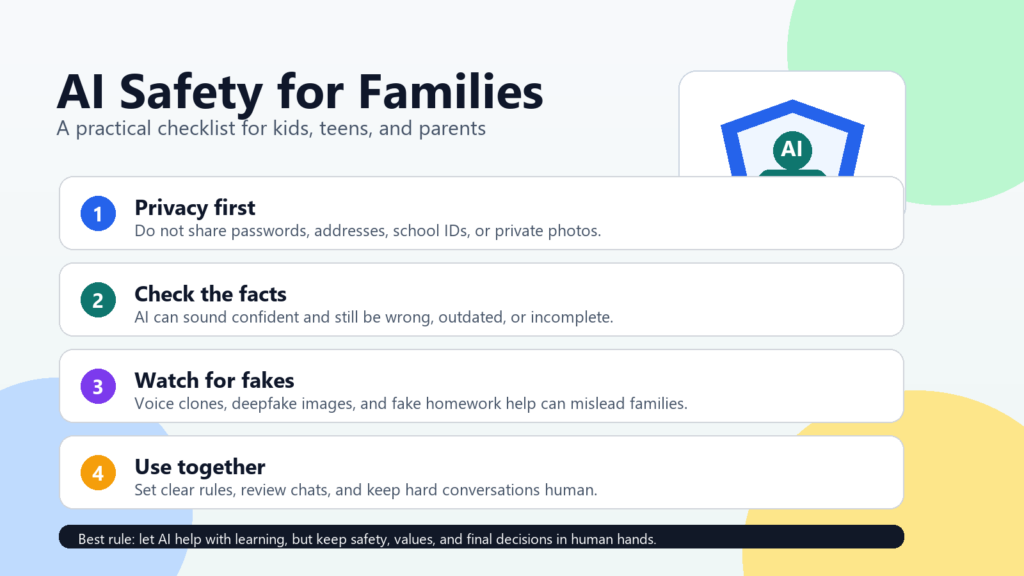
The first risk is accuracy. AI tools can produce answers that sound polished but are still wrong. A chatbot may invent a source, oversimplify a science topic, make a math mistake, or give advice that does not fit your family’s situation. Kids are especially vulnerable because a confident answer can feel official. A good family rule is: if the answer matters, verify it somewhere reliable.
The second risk is privacy. Children may not realize that a chatbot is not a diary. They might type in their full name, school, address, medical details, family conflict, or private photos because the tool feels conversational. OpenAI’s own guidance advises caution with kids, and parents should check the age requirements and privacy settings of any AI tool before allowing independent use.
The third risk is emotional attachment. Some AI tools are designed to act friendly, supportive, or even companion-like. That can feel comforting, especially for lonely teens, but it can also blur boundaries. AI should not become the only place a child takes fear, sadness, anger, or relationship problems. If a young person is distressed, isolated, or talking about self-harm, involve a trusted adult and professional support right away. In the United States, the 988 Suicide & Crisis Lifeline is available by call, text, or chat.
The fourth risk is fake media. AI-generated images, voices, videos, and messages can be used to bully, impersonate, embarrass, or scam people. The Department of Homeland Security’s Know2Protect campaign warns parents and trusted adults about AI and deepfakes, while the FTC has warned that scammers can clone a loved one’s voice from short audio clips and use it in fake emergency schemes.
Set Simple Family Rules Before There Is a Problem
The easiest time to set AI rules is before something goes wrong. Sit down for a short family conversation and make the rules plain. You do not need to sound dramatic. Try saying, “AI can be useful, but it can also be wrong or unsafe, so our family uses it with a few guardrails.”
- Ask first for new AI apps. Children should not create accounts or upload information without a parent or guardian reviewing the tool.
- Keep private details private. No passwords, addresses, phone numbers, school IDs, health details, family financial information, or private photos.
- Use AI for help, not cheating. It can explain, quiz, brainstorm, or organize ideas, but schoolwork should still reflect the student’s own thinking.
- Verify important answers. Health, money, legal, safety, and school policy questions should be checked with a real expert or reliable source.
- Tell an adult about scary, sexual, threatening, or confusing AI content. Kids should know they will not be punished for asking for help.
Rules work better when adults follow them too. If parents casually paste private family details into AI tools, children will copy that behavior. Model the habits you want: remove sensitive information, check sources, and say out loud when you are verifying an AI answer.
Privacy, Parental Controls, and Age-Appropriate Use
Before a child or teen uses an AI chatbot, check the tool’s age rules, privacy policy, data settings, and parental controls. For ChatGPT specifically, OpenAI says parents and teens can link accounts through parental controls, allowing parents to manage selected settings, set quiet hours, and receive limited safety alerts in certain situations. OpenAI also says ChatGPT is not intended for all ages and advises caution even for kids who meet the age requirements.
That does not mean one product setting solves everything. Parental controls are helpful, but they are not a substitute for conversation. A teen can misunderstand a tool, use a different platform, or encounter AI-generated content through social media without ever opening a chatbot app. The goal is not perfect surveillance. The goal is trust plus reasonable boundaries.
A practical privacy rule is to treat AI prompts like postcards, not locked diaries. Only type what you would be comfortable sharing in a semi-public setting. For younger kids, use AI together on a parent account or in a school-approved environment. For teens, talk about which topics are okay to explore independently and which topics require adult help.
Deepfakes, Voice Clones, and AI Scams
Families also need a plan for AI-powered deception. A scammer may call pretending to be a child, grandchild, parent, school official, or police officer. The voice may sound real. The story may be urgent. The request may be money, secrecy, gift cards, a wire transfer, or personal information. The FTC’s advice for fake emergency scams is simple but powerful: slow down, verify the story, and contact the person directly using a phone number you already trust.
Create a family verification phrase. It does not need to be fancy. Choose a phrase that only close family members know, and use it if someone calls or texts with an emergency request. Also agree that no real family emergency requires gift cards, cryptocurrency, or secrecy from other trusted adults.
Deepfake images and videos are another concern, especially for teens. AI can be used to create fake embarrassing, sexual, or bullying content. NCMEC warns that generative AI can be involved in harmful fake images, peer victimization, and exploitation. Children should know that if someone threatens them with an image, real or fake, they should get help immediately. They should not pay, negotiate, or try to handle it alone.
Use AI for Learning Without Letting It Do the Learning
AI can be wonderful for learning when used well. It can explain a confusing paragraph, make practice questions, translate a phrase, suggest study plans, or help a child brainstorm ideas before writing. Common Sense Media notes that generative AI can support learning, but parents should monitor use, set privacy controls, and help kids understand limitations.
A good homework prompt is: “Explain this concept at a seventh-grade level and give me three practice questions.” A risky homework prompt is: “Write my essay for me.” The difference matters. One builds understanding. The other skips the thinking and can create academic integrity problems.
Encourage kids to ask AI for explanations, examples, quizzes, outlines, and feedback. Then ask them to explain the answer back to you in their own words. If they cannot explain it, they have not learned it yet. That one habit keeps AI in its proper place: a helper, not a shortcut around the mind.
A Quick AI Safety Checklist for Families
- Review age requirements and parental controls before your child uses an AI tool.
- Keep sensitive personal, school, medical, and financial details out of prompts.
- Verify important answers with trusted sources or real experts.
- Use AI for brainstorming, tutoring, and practice, not cheating.
- Make a family verification phrase for emergency calls and texts.
- Teach kids that deepfakes and voice clones can look or sound real.
- Tell children they can come to you about scary or embarrassing AI content without being blamed.
- Keep emotional support human, especially when a child is distressed or isolated.
AI safety for families is really about staying involved. You do not have to master every tool the day it launches. You just need to keep the conversation open, set expectations early, and remind kids that technology should serve human judgment, not replace it.
For more on everyday AI use, you may also like How to Use ChatGPT-5 for Personal Budgeting and How People Feel About AI Today.
Sources and Further Reading
- Common Sense Media: Parents’ Ultimate Guide to Generative AI
- OpenAI Help Center: Is ChatGPT safe for all ages?
- OpenAI Help Center: Parental Controls on ChatGPT FAQ
- FTC: Scammers Use Fake Emergencies To Steal Your Money
- DHS Know2Protect: AI and Deepfakes Tips for Parents
- NCMEC: Generative AI
- NIST: AI Risk Management Framework
- UNICEF: Guidance on AI and Children
- SAMHSA: 988 Suicide & Crisis Lifeline